
Readability Information and Resources
Teachers often would like to check the readability of a piece of writing. Edward Fry, formerly of the Rutgers University Reading Center, created one of the most widely used, and easy-to-use readability graphs for educators. Thanks go to McGraw-Hill for granting me permission to reproduce this information on the Web. (Taken from Fry, Edward.Elementary Reading Instruction. NY: McGraw-Hill, 1977, p.217) and most currently appearing in his book, The Reading Teachers Books of Lists (2006). Dr. Fry has let me know that the graph is copyright free, but one cannot alter the graph or directions and still call it the Fry Readability Graph. Thank you to Dr. Fry for letting me know teachers can use the graph, copyright free!
Directions for Use of the Fry Readability Graph
Additional Directions for Working Readability Graph
Directions for Use of the Fry Readability Graph
- Randomly select three 100-word passages from a book or an article.
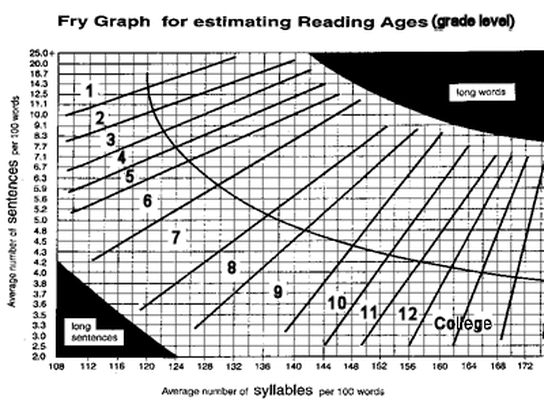
- Plot the average number of syllables and the average number of sentences per 100 words on the graph to determine the grade level of the material.
- Choose more passages per book if great variability is observed and conclude that the book has uneven readability.
- Few books will fall into the solid black area, but when they do, grade level scores are invalid.
Additional Directions for Working Readability Graph
- Randomly select three sample passages and count exactly 100 words beginning with the beginning of a sentence. Don't count numbers. Do count proper nouns.
- Count the number of sentences in the hundred words, estimating length of the fraction of the last sentence to the nearest 1/10th.
- Count the total number of syllables in the 100-word passage. If you don't have a hand counter available, an easy way is to simply put a mark above every syllable over one in each word, then, when you get to the end of the passage, count the number of marks and add 100.
- Enter graph with average sentence length and number of syllables; plot dot where the two lines intersect. Area where dot is plotted will give you the approximate grade level.
- If a great deal of variability is found, putting more sample counts into the average is desirable.

|

| ||||
- You may also want to check out a piece of software called Readability Plus (for both the PC or Mac) which includes the readability formulas for Dale-Chall, Fry, Flesch Grade Level, Flesch Reading Ease, FOG, SMOG, FORCAST, Powers-Somner-Kearl, and Spache. You can either import a text file, cut-and-paste into the entry box, or type the passages yourself.
- Here is another site which explains how to use the Gunning Fox Index, the Flesch Formula, and the Power Sumner Kearl formula to determine readability levels.
- This site allows you to input a URL and have various readabilities calculated and also contains some of the readability formulas
- This one explains readability and its relation to school textbooks.
- Storytoolz allows you to input text to have the readability calculated.
You can also check the readability level of a passage using the Flesch Reading Ease and the Flesch-Kincaid Grade Level built into tWord for Windows and Mac.
- Windows
- Mac: Highlight text
Pick to check “spelling and grammar”
Click on “options”
Under grammar pick “show readability statistics” - See #19 in this article for an explanation of the Flesch-Kincaid statistics.
Following are some sites for searching databases of leveled books.
- CA Book Reading Level Database
- Harcourt Textbook Leveling Guide
- Leveled Picture Books Database
- Lexile Analyzer (free registration required)
- Lexile Level Searchable Database
Additional tools for determining readability
- Google Chrome Extension which computes the Flesch-Kincaid level of any Web page
- Readability Grader
- Text Readability
- Readability Test Tool
- Readability Test (URL)
|
Copyright: Kathy Schrock. All rights reserved.
Republishing of these lists of links without express and written permission from this site's author is not allowed. Links to this page may be used, provided that full and clear credit is given to Kathy Schrock and Kathy Schrock's Guide to Everything with appropriate and specific direction (via the URL) to the original compilation of information on this page. Permissions beyond the scope of this license may be available by emailing the creator. |
Click to set custom HTML
Created: 07/01/1995
Updated: 01/08/2022 Kathy Schrock URL of this page: https://schrockguide.net/frys-readability-info.html |
